
📡 Wireless Audio Systems
Wireless audio systems allow microphones, instruments and monitoring systems to transmit audio signals without physical cables.
These systems are essential in concerts, television, theatre productions, conferences and live events.
RF Transmission
Wireless systems use radio frequency (RF) transmission to send audio signals between transmitters and receivers.
The transmitter converts the audio signal into a radio signal, while the receiver converts it back into audio.
Professional systems operate in carefully regulated frequency ranges to ensure interference-free transmissions that comply with the laws of each country.
In the European Union, spectrum use is determined by the National Frequency Allocation Table (NFAT). In Spain, certain specific frequencies require a license, while others are reserved for general use. The main ranges are distributed as follows:
UHF band (Ultra High Frequency)
470 - 694 MHz:
The professional standard. It's the most widely used band for professional television and broadcast productions, theaters, concerts, and events. It offers the best balance of range, penetration through obstacles, and stability.
Common Use Band
863 - 865 MHz:
For home use. Bands reserved for the general public, compatible with home or small-scale equipment without the need for an administrative license. Ideal for portable systems, tour guides, or small venues. The range is narrow, so it doesn't allow for the simultaneous use of too many systems.
1880 - 1900 MHz:
Used for conference systems and digital wireless voice microphones (DECT technology).
Unlicensed Bands (2.4 GHz and ISM)
2.4 GHz (y parcialmente 5 GHz / 5.8 GHz):
Used by digital systems worldwide. As a global frequency, it does not require a license. However, it shares spectrum with Wi-Fi, Bluetooth, and other everyday devices, increasing the risk of outages and interference in congested areas.
Prohibited and Obsolete Ranks
It is essential to be careful with old equipment or equipment imported from other countries (such as the United States), as they operate on frequencies that are currently prohibited and illegal in Europe.
694 - 790 MHz:
Prohibited for wireless audio, as it was reassigned for 5G mobile phone services.
790 - 862 MHz:
Many of the devices that operated between 790 and 862 MHz can no longer be used for audio due to the digital dividend.
To avoid penalties or audio failures, professional brands like Shure and Sennheiser divide their equipment into specific geographical ranges (called "frequency groups") designed to comply with the laws of each territory.
Wireless Microphones
Wireless microphones are commonly used by presenters, singers and performers who need freedom of movement.
Antennas
Antennas play a critical role in RF performance.
Proper antenna placement improves signal strength and reduces dropouts.
Directional antennas are often used in professional touring systems.
Frequency Coordination
Multiple wireless systems operating simultaneously can interfere with each other.
Frequency coordination helps avoid conflicts between wireless channels.
Professional productions carefully plan RF frequencies before events.
Interference
Wireless systems can experience failures. Good management of radio frequency channel usage minimizes these problems.
RF interference
Audio equipment (wireless microphones, cables, speakers) is very sensitive and sometimes picks up radio frequency (RF) energy from the environment. When this energy enters the audio circuits, the electronic components "rectify" it (incorrectly convert it into an audio signal).
This creates a superimposed signal that muddies and distorts the original sound when unwanted external electromagnetic waves leak into audio equipment or are induced by cables. This causes buzzing, static, or other strange noises in speakers, headphones, or microphones. It commonly occurs when using wireless microphones, electric guitars, or very long audio cables. Audio cabling acts like an antenna, picking up electromagnetic radiation.

The phenomenon of interference is a distortion caused by the summation of several waves, which occurs when an external signal electromagnetically interferes with our audio system. These signals add together, and when two or more waves occupy the same point, the resulting amplitude at each point is the sum of the amplitudes of the individual waves. In noise-canceling systems or components, the signals subtract to obtain an amplitude smaller than their components (destructive interference). In other cases, such as in linear speaker systems, the summed variation will have a greater amplitude than any of the individual components (constructive interference).
The most common sources of this "pollution" in the environment are:
- Mobile phones or smartphones when receiving calls or data (especially on 4G or 5G networks).
- Wi-Fi routers and Bluetooth devices.
- Power supplies and chargers (especially low quality ones).
- Fluorescent lamps and light regulators (dimmers).
- Electric motors and household appliances.
- Nearby transmitters (radio, television or amateur radio stations).
Most common types of distortion:
- Audible interference: The classic "clicks" or rhythmic buzzing sounds (e.g., buzzz-buzzz) emitted by the speakers just before the mobile phone rings.
- Floor noise: A constant hissing or buzzing that reduces the quality and clarity of the sound.
- Signal Dropouts: Temporary losses or cuts in the audio of wireless microphones or headphones.
Signal reflections
They are the "bounce" of the electromagnetic wave that carries the sound. This occurs when the signal hits an obstacle (such as walls or metal) or when there is a fault in the cable connection, causing a loss of power and audio problems.
In wireless sound systems (such as microphones or in-ear monitors), sound is transformed into a radio frequency (RF) wave to travel through the air or cables. Reflections occur primarily for two reasons:
Due to the environment (Wireless propagation)
When the signal travels through the air and hits smooth objects larger than the wave itself (walls, doors, mirrors, metal stages or the human body itself), the signal bounces off in multiple directions.
The problem: When the signal bounces off the antenna, it reaches the receiver at different times (similar to an acoustic echo). This creates a phenomenon called phase cancellation or signal fading, causing brief dropouts or clicks in the audio.
The solution: Diversity antenna technology and advanced modulation systems ensure that the cleanest signal is always chosen to avoid these drops.
Due to the equipment (impedance mismatch)
In wired connections (such as coaxial cables connecting an antenna to the receiver), power must flow continuously.
The problem: If the impedance (resistance to the flow of alternating current, usually 50 ohms (Ω) in RF) is not the same at the transmitter, the cable, and the receiver, some of the signal energy is not absorbed and bounces back to the source.
The solution: Using cables, connectors, and antennas with the correct impedance ensures proper termination, allowing the receiver to absorb all the energy and the system to function efficiently.
How to solve interference problems?
You can solve most of these problems with simple actions:
- Keep potential sources of interference away. Keep mobile phones and other transmitting devices a safe distance (at least a couple of meters) from your cables and audio equipment.
- Activate airplane mode if you use your smartphone near recording equipment to block RF emissions.
- Use balanced, shielded cables. Use good quality cables and connectors like XLR or TRS. These offer better shielding against electromagnetic interference.
- Avoid unnecessary long cables. An excessively long cable acts like a larger antenna and is more likely to pick up interference.
- Ferrite cores. Place ferrite cores (the small cylinders that sometimes come in cables) near the ends to filter out stray frequencies.
- Check the frequencies: In the case of wireless microphones, make sure you are using channels or frequencies free of interference in your area.
In-Ear Monitoring
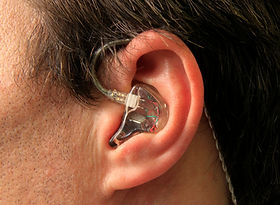
Wireless in-ear monitoring systems allow performers to hear customized monitor mixes during live performances.
IEM systems reduce stage volume and improve monitoring clarity.